|
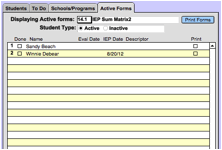
From this tab, staff members can: ·
View
any active forms for their students, whether those students are active or
inactive. ·
Print
forms or form sets. To View Forms: ·
Select
the form you want from the drop-down list next to “Displaying Active forms:” ·
Choose
the Student Type. ·
Students
with that form in their records will appear in the list. ·
Click
the student name to view the form. ·
To Print Forms: · Select the Print checkbox for one or more students’ forms. · Then select the Print Forms button. |