Additional Information Field
Many
of the forms in E-Com have an “additional information” field as the final page
of the form. This is for use when you run out of room in a text field on that
form. Text fields may appear to
expand while you are typing, but if you overfill a field, text that is past the
field’s bottom margin will not print.
|
|
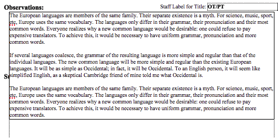
In
the image to the left, the cursor is inside the text box, and you can see all
of the text. However, the text box is overfilled. It overlaps the question
directly below it.
|
|
|
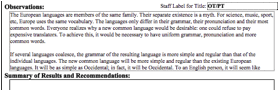
When
the cursor is no longer inside the text box, you can see how the page will
appear when printed. Only the first three lines of the second paragraph will
print.
|
If
you notice that you are close to the end of a field, or if you have gotten out
of a text field and notice that not all of your text is visible, as shown
above, you can use the “Additional Information” field for the overflow.
 Simply
click on the “Enter More” button in the Form Navigation Bar and you will be
brought automatically to the large “Additional Information” field at the bottom
of the form. Here you may continue adding text; you may also cut and paste text
from the field that has been overfilled.
Simply
click on the “Enter More” button in the Form Navigation Bar and you will be
brought automatically to the large “Additional Information” field at the bottom
of the form. Here you may continue adding text; you may also cut and paste text
from the field that has been overfilled.
This
preserves the pagination of the form itself while allowing additional
information to be added. Once text has been entered in this field, it will
print out at the end of the other form pages. The student’s name is
automatically added, so the additional page(s) are always identifiable.
Related Topics
Additional Form Functionality
Copyright (c) 2004-2008 Macrobject Software, All Rights Reserved.
You can change this copyright message in the "Template Settings" dialog.