On page 4 of the Evaluation Report you will find the Recommended Special Education and Related Services section. Click Add Area to add each Area of Service defined.
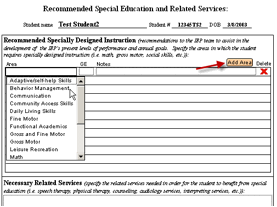 Areas of Service added here will
automatically be populated to the Placement tab
and the Student
Information section of the Student
Screen if the form 4.5 they are added to is the most recent 4.5 form in
the student’s record.
Areas of Service added here will
automatically be populated to the Placement tab
and the Student
Information section of the Student
Screen if the form 4.5 they are added to is the most recent 4.5 form in
the student’s record.
If other Areas of Service have been added manually using the Placement tab on the Student screen, they will be saved and removed automatically when a batch containing form 4.5 is added to the student. If this form or batch is removed, these Areas of Service will return.
Additional Notes: If a 4.5 form is duplicated, the new form will not contain Areas of Service. These must be assigned manually. Also, if a disabling condition changes, refreshing the form will place the new condition on the first page. The condition field on page 3 must be manually updated after a refresh, however.