Students classified as active in Special Ed in the district’s student information system are completely* pulled in via an automated process.
1) 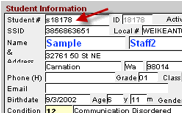 For new student referrals or transfers,
authorized users can select the New button
and then enter the student’s SSID or Student Number on the
new record created.
For new student referrals or transfers,
authorized users can select the New button
and then enter the student’s SSID or Student Number on the
new record created.
If the student has been entered into the school’s student information system and the import was successful, data
for the student will automatically populate into E-Com.
2) If
the scenario detailed above does not populate the data, the student either has
not yet been added to the school’s information system or the import has not yet occurred. In that case, the remainder
of the student data will need to be entered manually or users can wait for
the import to take place before entering the new student.