The Batch Listing displays all batches that have been added for a particular student.
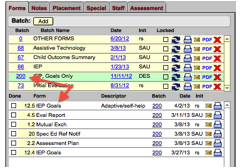 Clicking
on a batch number highlights that batch row in green and displays all forms
for the batch in the Forms Listing located
directly under the Batch Listing. Locked forms will appear with a red
highlight around the “Done” checkbox. Locked forms may not be edited; they
may only be unlocked by an administrator.
Clicking
on a batch number highlights that batch row in green and displays all forms
for the batch in the Forms Listing located
directly under the Batch Listing. Locked forms will appear with a red
highlight around the “Done” checkbox. Locked forms may not be edited; they
may only be unlocked by an administrator.
Any form not associated with a particular batch should be added to the “OTHER FORMS” batch.