 You
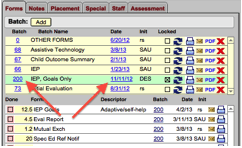
can use this feature to set or reset the date for all forms in the batch.
You
can use this feature to set or reset the date for all forms in the batch.
1) Select the batch number for the batch you want to change. The batch selected will be highlighted.
2) Click on the batch date field to update the IEP or Eval date for forms in the batch. This only works for IEP or Eval batches, and will only update IEP or Eval date fields on forms.