Find & Replace Text in a Form
The Find & Replace function can be very
useful when correcting an error or updating data on a duplicated form. For
example, if you have an evaluation where you have used 'Bob' for the student's
name, but you want to change it to 'Robert', you can use the Find & Replace
function to do this quickly and easily.
Another common example would be when a
psychologist (or SLP, OT, PT, etc.) has an Individual Evaluation they have set
up for a particular testing situation. If they duplicate that Eval to a new
student, the Find & Replace function allows the specialist to quickly
update the new form with the student's name.
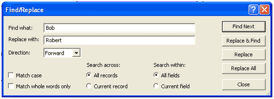 To use Find & Replace, open the form
that you'd like to work with and choose 'Find/Replace' from the Edit menu. This
will display the dialog below. Simply enter your 'Find' and 'Replace' text and
click the appropriate button on the right. It’s as easy as that!
To use Find & Replace, open the form
that you'd like to work with and choose 'Find/Replace' from the Edit menu. This
will display the dialog below. Simply enter your 'Find' and 'Replace' text and
click the appropriate button on the right. It’s as easy as that!
Related Topics
Additional Form Functionality
Copyright (c) 2004-2008 Macrobject Software, All Rights Reserved.
You can change this copyright message in the "Template Settings" dialog.