
To find records that don't match criteria:
In find mode, type criteria you wish to omit - To find all students except those with a particular condition, enter that condition in the Condition field.
Select Omit from the “Matching Records:” option.
Click Find.
There are two different methods to find some records while omitting others. The second method is particularly helpful when you have run a Find and discovered that you need to narrow the found set.
Example:
In Find mode, type the criteria for the records to find - to find male students with a particular condition, start by entering the condition in the condition field.
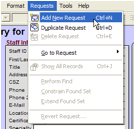
Choose Requests menu > Add New Request.
To exclude female students, you would select F in the Gender field and select Omit.
Click Find.
Example:
To find active students with a particular condition, click Find and enter the condition in the Condition field. Click Find again.
When the found set is returned, you realize you want to omit students who are in a particular school.
Click the Find button again, and enter the school in the School field. Select Omit from the Matching Records area.
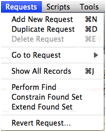
Do not click Find or enter. Instead, go up to the Requests drop-down on the menu bar and select “Constrain Found Set.”
This will remove students in that particular school from the current found set.