|
|
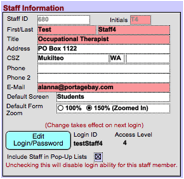
For best practices and in order to take better advantage of E-Com functionality, we recommend that the fields highlighted in red* be populated for all users. All other fields are optional. If your district uses SIS imports and imports case manager names, the Staff ID field should be filled with the staff ID in use in Skyward, in order to properly match case manager names. Note: If you enter a phone number in the Phone field, it will auto-populate to some forms. Do not use the Phone field for home phone numbers unless it is your district’s policy to give out home phone numbers. * Fields highlighted in the image to the left are NOT highlighted within the application itself. |