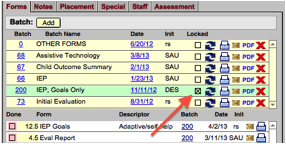
 Once
all the forms within a batch are done, the batch may be locked so that
completed forms are not accidentally changed. If the batch is locked, the
Locked checkbox will be checked in the Batch view.
Once
all the forms within a batch are done, the batch may be locked so that
completed forms are not accidentally changed. If the batch is locked, the
Locked checkbox will be checked in the Batch view.Once
all the forms within a batch are done, the batch may be locked so that
completed forms are not accidentally changed. If the batch is locked, the
Locked checkbox will be checked in the Batch view.
Forms and batches may only be locked, unlocked, or edited by Admin users. Forms that are locked have a red square behind the Done checkbox in the Form view.
Note: Generally, if an IEP batch is locked, that batch’s progress report forms remain unlocked so that progress may be charted over the course of the IEP period.
Related Topics