Screen Overview
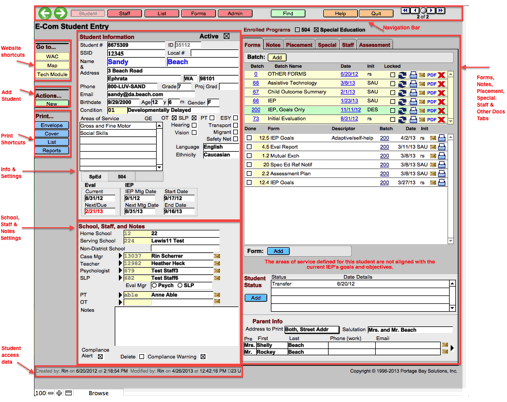
The Student Entry screen is where all the information
for a student is entered and stored.
From this screen, users can access and/or manage (depending on their
privileges and the setup at their district) a variety of items related to a
particular student, including but not limited to:
- Student
identifying information such as address, age, area of service needs, etc.
- School
information such as home, serving, and other non-district schools.
- Teacher,
case manager, and other staff
assignments
- Forms and batch
management – Creating, accessing, emailing and printing
- Printing
shortcuts for envelopes, labels, cover sheets, and other reports.
- Parent
information.
Related Topics
Chapter 4: Student Screen
Copyright (c) 2004-2008 Macrobject Software, All Rights Reserved.
You can change this copyright message in the "Template Settings" dialog.