|
|
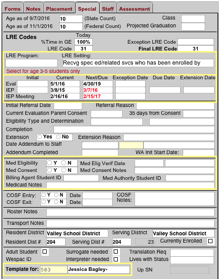
A few of the fields to note are: 1) LRE Codes section: Data in this section is generated
when the IEP Summary Matrix form (#14.1x) is completed for a student. For data to correctly display here: · The dates (esp. the year) set in the “Age as of” fields need to be showing the current school year. If they are not, contact your Admin for updating. · The 14.1x form must have services and an LRE setting selected. See the Summary of Services Matrix information. Automatic LRE codes can be manually overridden via the Exception LRE Code field. 2) Eval and IEP date fields: · Current and Next IEP/Eval date fields: Conforming to state and federal standards, the Next IEP and Next Eval fields default to 1 or 3 years minus a day (respectively) from the current date set. · Exception Date fields: Adding an Exception Date will also modify the respective Next/Due field entry. · Due Date field: The date that an evaluation is due may be entered here. · Other information, such as referral date, parent consent date, and the like may also be added. 3) Medicaid Eligibility: The student’s
Medicaid status may be entered here. If the student is marked as eligible
here, there will be a red header on the student screen. 4) Template For fields: Use of this
field ties the student being viewed to the listed staff member’s My Template
button. |