You may view two forms side by side.
1. Open the first of the two
forms that you would like to see side by side. Close it.
2. Open the second of your two
forms.
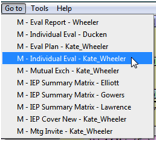
3. From the ‘Go To’ menu,
select the form you opened in Step 1.
Your two forms will now be
displayed side by side. Clicking on the Student button or leaving either form
will close both forms. The ‘Go To’ menu maintains a list of the last ten
forms you’ve accessed. You can view any two forms in the list side by side.