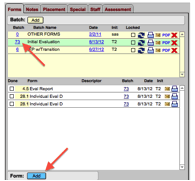
From the Batch listing, click the batch number of the batch to which you want the form added.
If you don’t want the form to be included with any particular batch, click on the “Other Forms” batch.
Click on the Add button below the Forms listings. This generates a pop-up menu within the Forms listing area.
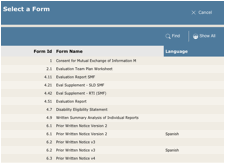
A new window will open with a list of Forms. Use the mouse to select the desired form. Use the scroll bar to see all the forms available in the menu. Click Find to search for a particular form.
Once selected, the row will automatically fill in.
 In
certain situations, it may be necessary to have multiple instances of the
same form. Users can use the Descriptor
field to include additional identifying information about such forms (e.g.,
semester info on progress reports, second prior written notice).
In
certain situations, it may be necessary to have multiple instances of the
same form. Users can use the Descriptor
field to include additional identifying information about such forms (e.g.,
semester info on progress reports, second prior written notice).