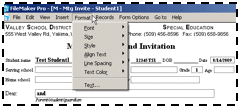
You can then format the text in a variety of ways -- change font size or style, alter the justification (left, right, center), and use tabs* to help line up columns of numbers.
Users can either access the Format menu or right-click on any text field to change these preferences.
 * Clicking the tab key in
E-Com takes you from field to field on the forms. To get a Tab character, type
Control-Tab (Option –Tab on a Macintosh). See “Using the Text Ruler” to further fine-tune tab
alignment.
* Clicking the tab key in
E-Com takes you from field to field on the forms. To get a Tab character, type
Control-Tab (Option –Tab on a Macintosh). See “Using the Text Ruler” to further fine-tune tab
alignment.