The ‘Address to Print’ popup menu allows you to select which address will appear on envelopes printed for the student, or on certain forms that automatically fill in the student address. It also changes the salutation used on the envelope or form.
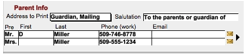 To
view more detailed parent information, click on the black triangle located
between both parents names to access the Parent Data Entry Screen.
To
view more detailed parent information, click on the black triangle located
between both parents names to access the Parent Data Entry Screen.