|
|
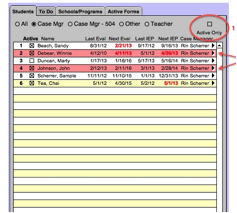
The All, Case Mgr, Other and Teacher buttons on the Students tab show the students assigned to the staff person in those roles. Selecting the Case Mgr button shows the students for whom the staff member is the case manager; the Other tab shows the students for whom the staff member is the SLP, OT, PT, Psychologist, etc. 1) Active Only checkbox - When this box is unchecked, all students assigned to the staff member will be displayed regardless of their active/inactive status. 2) Row highlighting - If a row is highlighted in this screen, it means that an entry on the Notes tab from the Student screen is set as “To Do”. Note:
Eval and IEP dates will be color coded based on district preferences. |