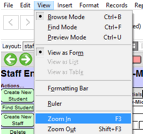
Any screen or form in E-Com can be viewed at normal size, or you can zoom in or out. You can still enter data when zoomed in or out. Many people prefer entering data on forms while zoomed in.
In addition, you can set
whether you want forms to always open for you in zoom mode. On the staff
screen, you can select “150% (Zoomed in)” in the Default Form Zoom field. The
next time you log in, each form you open will open at 150% of the usual size.
This only works with forms; the student screen and other data entry screens
will remain at 100%. For detailed instructions, see Default
Zoom Settings.
Related Topics