 Access the Student screen for the student
you want to assign as your template student, either by running a find or
navigating to their Student screen by another method.
Access the Student screen for the student
you want to assign as your template student, either by running a find or
navigating to their Student screen by another method.
Click the Special tab as shown at right.
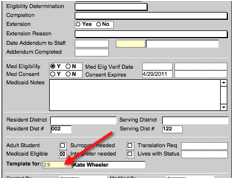
Finally, select yourself from the Template For popup menu at the bottom as shown.
Note: Be cautious when
selecting a real student as your template. Any changes made to a template record
will make real time changes to
that record.
To return to the Staff
Entry screen from this screen, click on the “Staff” navigation button.