Envelope – This prints an envelope addressed to the parents of the student. The salutation format will be set according to the choice set for the ‘Address to Print’ field on the Parent Information section.
Cover – Prints a cover sheet that includes the data from the Student Information section, Schools, Staff Assignments, Parent Information and Areas of Service.
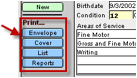 List
– Prints a list view with high level data about the student.
List
– Prints a list view with high level data about the student.
Reports – Sends the user to the E-Com Reports screen. In addition to a number of reports based on code, grade, age, case manager, etc., you will also find a button that allows you to print labels in 5160 format, with a choice of 1 or 3 labels per student. Salutation on these labels may be changed in the same way as on the envelopes above.